Basic Settings
This section describes the operations available on the Basic Settings tab of the AI Check screen.
Basic Settings Tab
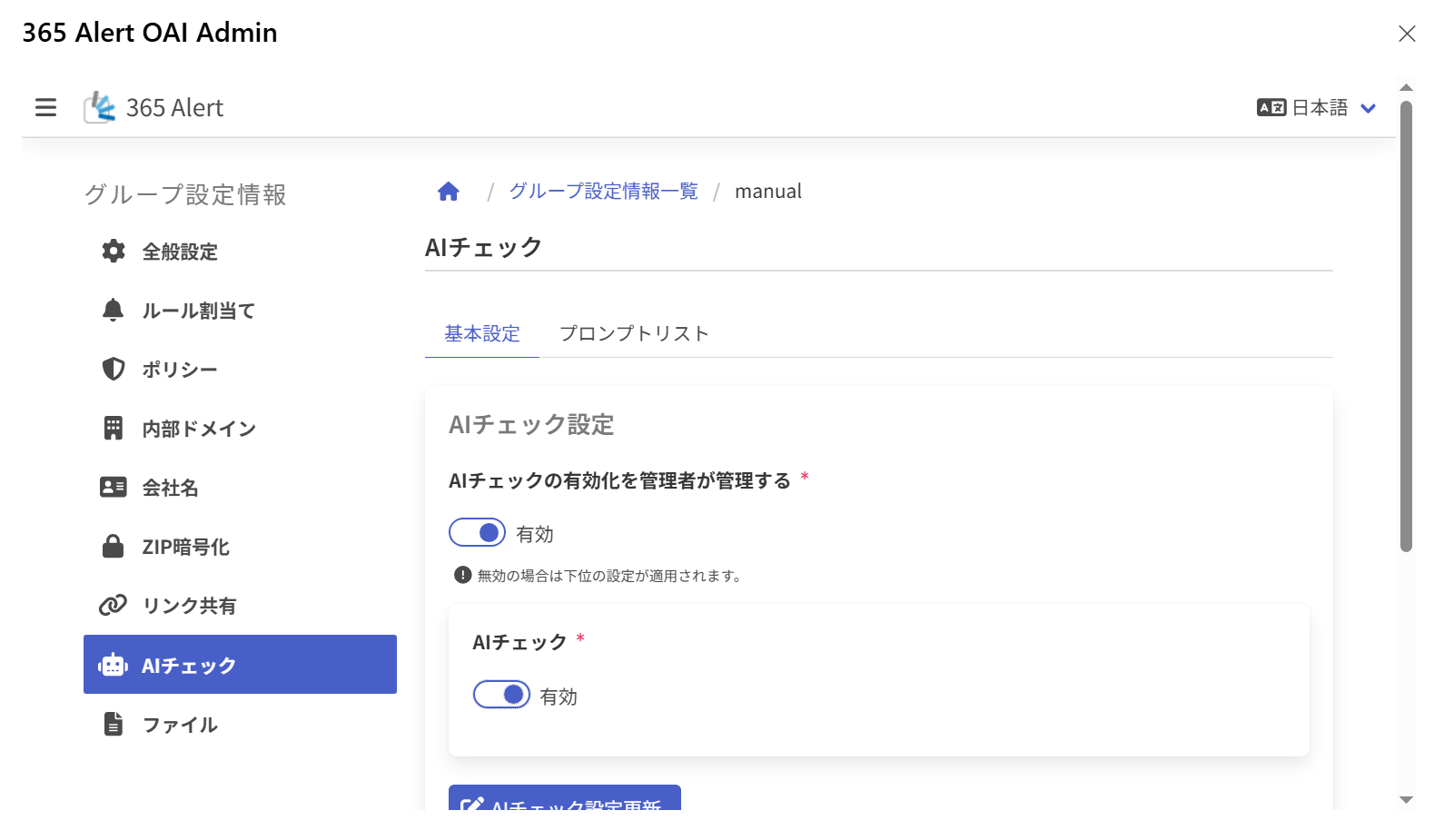
Updating the AI Check Settings
Configures the settings related to the enablement of AI Check.
Enter the following items and click Update AI Check Settings to save the settings.
| Item | Description |
|---|---|
| Administrator manages the enablement of AI Check | Enabled Prevents changing the AI Check enablement setting in the User Outlook Add-in, and displays the AI Check ON/OFF switch.Disabled The lower-level setting is applied. |
| AI Check | Enables (ON) / disables (OFF) the AI Check feature of the User Outlook Add-in. ※ Displayed when Administrator manages the enablement of AI Check is Enabled. |
Updating the Basic Settings
Configures the connection information for Azure OpenAI and the request parameters.
Enter the following items and click Update Basic Settings to save the settings.
| Item | Description |
|---|---|
| Administrator manages the AI Check basic settings | Enabled Prevents changing the basic settings in the User Outlook Add-in, and displays the setting fields for each item.Disabled The lower-level setting is applied. |
| Model name | Selects the Azure OpenAI model name. The following models are supported. ・gpt-5.4-mini ・gpt-5.4-nano ・gpt-5.6-luna ・gpt-4.1-mini ・gpt-4.1-nano |
| Deployment name | Enter the Azure OpenAI deployment name. (1-256 characters) |
| Endpoint URI | Enter the URL starting with https:// for accessing Azure OpenAI. (Up to 1025 characters) |
| Connection check | Clicking this performs a connection check with the entered model name, deployment name, and endpoint URI, and displays the result in a dialog. |
| Temperature | Enter the request parameter Temperature. (0.0-2.0, initial value 0.0) ※ Not displayed when a GPT-5 series model is selected. |
| TopP | Enter the request parameter TopP. (0.00-1.00, initial value 1.00) ※ Not displayed when a GPT-5 series model is selected. |
| Reasoning Effort | Select the request parameter Reasoning Effort. (none/low/medium/high, initial value none) ※ Not displayed when a GPT-4 series model is selected. |
| Text Verbosity | Select the request parameter Text Verbosity. (low/medium/high, initial value low) ※ Not displayed when a GPT-4 series model is selected. |
| MaxTokens | Enter the request parameter MaxTokens. (1-16384, initial value 800) Since this is the maximum number of tokens when making a request to Azure OpenAI, it must be set to a reasonably large value in practice. If the value is too small, a normal response cannot be generated, resulting in an error when running AI Check. |
| Maximum email body character count | Enter the maximum number of characters of the email body to send in the request. (0-2147483647, initial value 4000) |
| Manual AI Check execution | Enables (ON) / disables (OFF) the manual AI Check execution feature of the User Outlook Add-in. (initial value ON) |
About Models and Parameters
Selectable Models
In the AI Check feature of the Outlook Add-in, you can select one of gpt-5.4-mini/gpt-5.4-nano/gpt-5.6-luna/gpt-4.1-mini/gpt-4.1-nano. Many other AI models are also provided by the OpenAI API, but we have selected the above five small models as models that have the performance to judge email content and can be operated at low cost (as of July 2026).
Recommended Model
As of July 2026, we recommend using gpt-5.4-mini. If you prioritize cost, you can also select the lower-cost gpt-5.4-nano or gpt-4.1-mini/nano, but please note that their performance is somewhat inferior compared to 5.4-mini, and depending on the prompt content, there may be a higher probability of not obtaining the expected judgment result.
About Changing the API Parameters
Temperature, TopP, Reasoning Effort, Text Verbosity, and Max Tokens are parameters that can be set when calling the Azure OpenAI API. By changing these, you can finely control the AI's responses, but there is usually no need to change them. If you do change them, please have someone with specialized knowledge of AI do so after sufficient verification using the test execution feature.
Each item can be displayed and configured when Administrator manages the AI Check basic settings is Enabled.