Updating a Prompt Configuration
This section describes the operations available on the Update Prompt Configuration dialog, which is accessible from the Prompt List tab of the AI Check screen.
The Update Prompt Configuration dialog is displayed by clicking a name of an editable type in the prompt configuration list.
Update Prompt Configuration Dialog
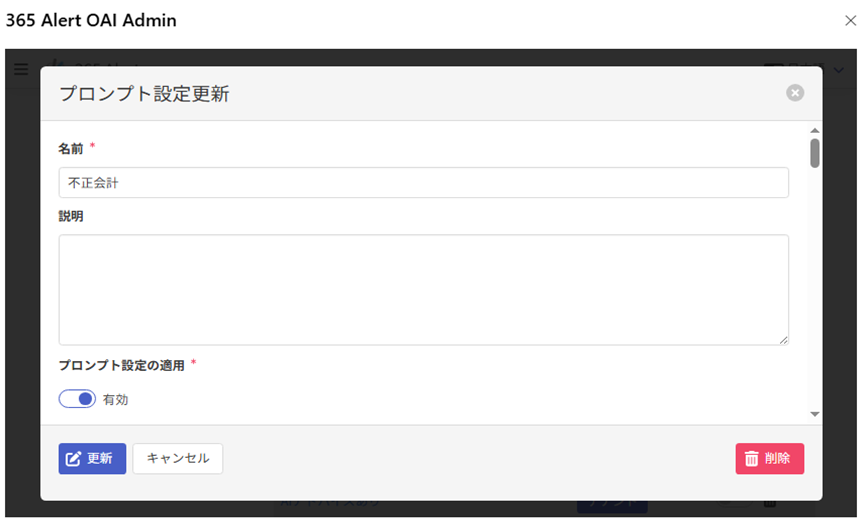
Updating a Prompt Configuration
On the Update Prompt Configuration dialog, enter the following items and click Update to update the prompt configuration.
| Item | Description |
|---|---|
| Name必須 | Update the name by referring to here. |
| Description | Update the description by referring to here. |
| Apply Prompt Configuration必須 | Update the application status by referring to here. |
| Default prompt必須 | Enter the prompt that is run when the prompt corresponding to the display language is empty. (Up to 2048 characters) |
| Japanese prompt | Update the prompt for Japanese. (Up to 2048 characters) |
| English prompt | Update the prompt for English. (Up to 2048 characters) |
| Chinese (Simplified) prompt | Update the prompt for Chinese (Simplified). (Up to 2048 characters) |
| Chinese (Traditional) prompt | Update the prompt for Chinese (Traditional). (Up to 2048 characters) |
You can also run a test of the prompt before updating.
For details on the test execution, refer to here.
Deleting a Prompt Configuration
On the Update Prompt Configuration dialog, click Delete to display a delete confirmation dialog, allowing you to delete that prompt configuration.