Adding a Prompt Configuration
This section describes the operations available on the Add Prompt Configuration dialog, which is accessible from the Prompt List tab of the AI Check screen.
Add Prompt Configuration Dialog
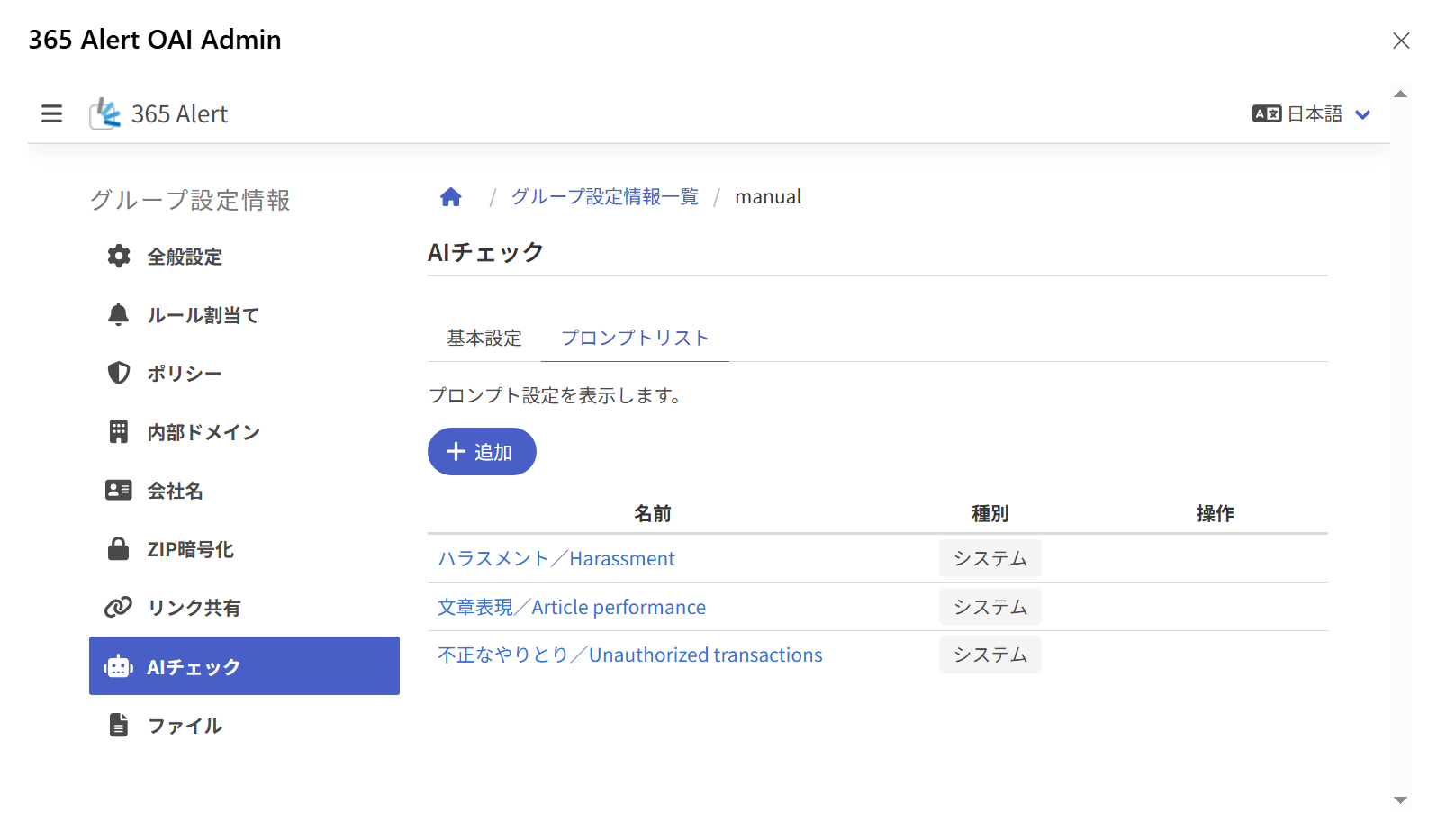
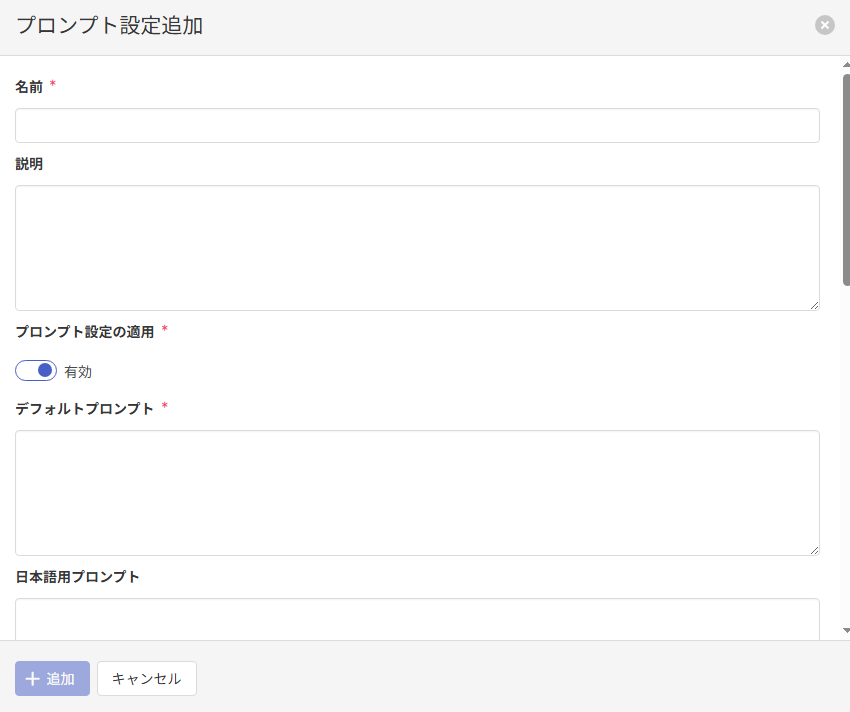
Adding a Prompt Configuration
On the Add Prompt Configuration dialog, enter the following items and click Add to add the prompt configuration.
| Item | Description |
|---|---|
| Name必須 | Enter the name of the prompt configuration. (1-256 characters) The name must be unique within the same type. |
| Description | Enter the description of the prompt configuration. (Up to 1024 characters) |
| Apply Prompt Configuration必須 | Specify whether to apply the registered prompt configuration. (initial value ON) |
| Default prompt必須 | Enter the prompt that is run when the prompt corresponding to the display language is empty. (Up to 2048 characters) |
| Japanese prompt | Enter the prompt for Japanese. (Up to 2048 characters) |
| English prompt | Enter the prompt for English. (Up to 2048 characters) |
| Chinese (Simplified) prompt | Enter the prompt for Chinese (Simplified). (Up to 2048 characters) |
| Chinese (Traditional) prompt | Enter the prompt for Chinese (Traditional). (Up to 2048 characters) |
The following system prompts are registered by default.
・Harassment
・Article performance
・Unauthorized transactions
System prompts cannot be edited, disabled, deleted, or otherwise operated on.
Run Test
Before registering a prompt configuration, you can run a test of the entered prompt.
Enter the following items and click Run Test to run a test using the Basic Settings and the entered prompt, and display the Prompt Test Result dialog.
| Item | Description |
|---|---|
| Test execution message | Enter the email body used for the test execution. During the test execution, it is cut off by the "Maximum email body character count" in the basic settings. This content is not saved as a setting value. |
| Prompt to test | Select the prompt to test from Default prompt, Japanese prompt, English prompt, Chinese (Simplified) prompt, or Chinese (Traditional) prompt.This content is not saved as a setting value. |
In the Prompt Test Result dialog, you can review the test results on the AI Check result, Response, and Token count tabs.
| Item | Description |
|---|---|
| AI Check result | Displays content equivalent to the AI Check result shown on the Send Alert when sending an email. |
| Response | Displays the content of the response returned by OpenAI. |
| Token count | Displays the number of tokens used for the request to OpenAI and the response from OpenAI. |
Prompt Writing Format
In a prompt, you must describe what you want the AI to judge in a certain format. You must also instruct the AI to output its response in JSON format including the five keywords level, kind, reason, because, and advice. If the AI's response is not in JSON format including these keywords, the check will fail, so when creating a new prompt, please write it by referring to the format of the prompts provided by the system.
For details on each item and keyword, refer to the following.
| Item | Description |
|---|---|
| Task | Describe, in Japanese, the request or instruction you want the AI to judge and evaluate. |
| Evaluation requirements | Instruct the AI to indicate the level of inappropriateness as a numeric value from 1 to 10. Also, describe the numeric range and meaning of the level so that the AI understands, such as "(1 = no problem, 10 = highly inappropriate)". |
| Evaluation items | (Specify with the following five keywords.) |
| level | The level specified in the evaluation requirements (e.g., the level of inappropriateness). Since level must be a numeric value, be sure to write "(numeric value only)". |
| kind | A word that expresses the evaluation result in a single phrase (e.g., the type (label) of the evaluation). If you want to limit the displayed content, you can also enumerate the candidate words and instruct the AI to select from among them. |
| reason | The point on which the judgment was based, such as a specific expression or context (e.g., the point judged (specific expression or context)). |
| because | The reason (background or intent) for arriving at that evaluation (e.g., the reason (background or intent) for arriving at that evaluation). |
| advice | Improvement suggestions from the AI (e.g., improvement suggestions for making the text better (polite, constructive expressions)). |
| Output format | Describe the output format in which you want the response. Here, you must specify that the response be in JSON format. In principle, write it as follows: ・Format: JSON ・Language: the same language as the input text ・Note: do not use arrays; write each item as a key and value |
| Additional instructions | Describe any other points you want the AI to be careful about in its response, or points you want to emphasize. Examples: ・Perform the evaluation fairly and objectively ・Do not include personal names or confidential information in the evaluation ・For "no problem", set level to 1 and kind to "no problem" |
The system does not check whether each keyword is included in the prompt. If a keyword is missing or misspelled, the check may not work correctly, so please be careful.